Why Do Phones Use Passcodes Even With Face Unlock for Payments?
In today’s mobile-first world, paying with your phone has become as common as swiping a credit card—if not more so. Thanks to digital wallets like Apple Pay, Google Wallet, and Samsung Pay, alongside saved payment methods inside apps and browsers, the process feels almost magical: a glance at your phone, a quick tap, and your purchase is complete. But have you ever wondered why, despite the convenience of facial recognition, your phone still often insists on entering a device passcode before approving some payments? This article digs into that question, exploring how security and user experience blend in mobile payments.
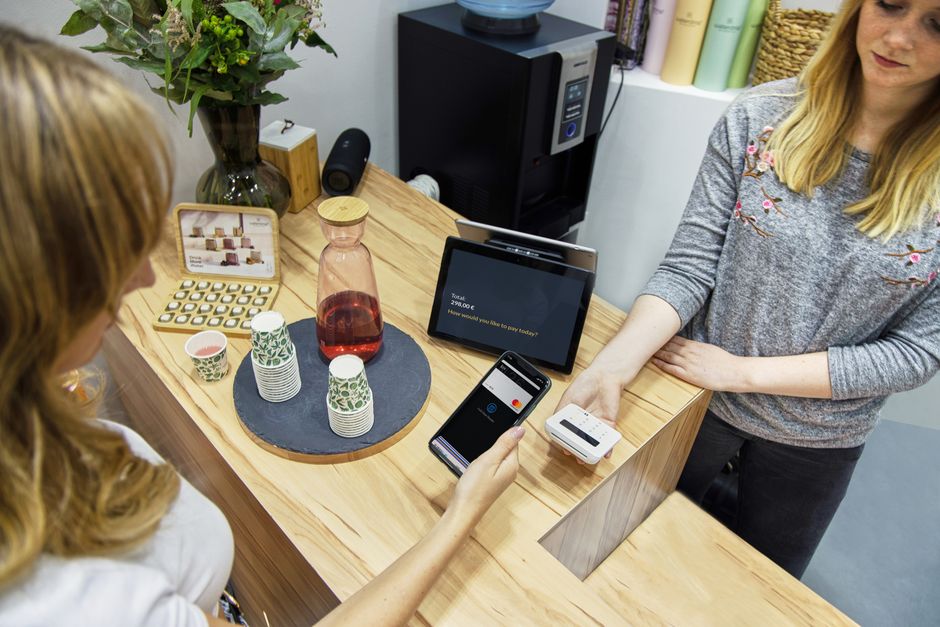
Phone-First Checkout Expectations
Today’s consumers expect seamless mobile checkout experiences. That means fewer taps, less typing, and minimized friction. Phones aren’t just communication devices—they’re digital wallets, loyalty cards, ticket holders, and even virtual IDs. This expectation pushes developers to design flows that feel instantaneous, intuitive, and hassle-free.
However, speedy checkout doesn’t mean lowering the guard on security. Devices must walk a fine line between convenience and protecting financial information. This is where the device passcode and facial recognition interplay becomes crucial.
The Role of Facial Recognition in Mobile Payments
Facial recognition, a key biometric authentication method, uses the phone’s sensors (cameras, infrared, structured light) to identify the user’s face. It offers:
- Speed: Unlocking or authorizing a payment often happens in a fraction of a second.
- Frictionless Experience: No need to remember or type a passcode, making checkout smoother.
- Strong Biometric Security: Advanced facial recognition systems like Apple's Face ID are designed to be highly resistant to spoofing.
Despite these benefits, facial recognition doesn’t fully replace the device passcode when it comes to certain payment authorizations.
Digital Wallets and Saved Payment Methods: How They Interact With Security
Digital wallets store your credit and debit cards (Visa, Mastercard, Amex) along with other payment methods such as PayPal or Apple Pay Cash. They save this payment data securely on your device and in cloud accounts under strict encryption and device security protocols.
A few key points about how digital wallets handle authentication:
- Biometric authentication protects access to your saved payment methods during typical transactions.
- Device passcodes act as a fallback when biometrics fail, or when a higher security step-up is required.
- Some transactions require explicit device passcode entry due to regulatory or issuer security requirements.
So NCSC guidance on mobile payments although facial recognition covers the everyday use case, the device passcode is still critical for additional security.
When Is Using a Device Passcode Required?
You might encounter the passcode prompt in various cases:
- After Reboot or Extended Lockout: Biometrics aren’t accepted until the device has been unlocked with a passcode once after power cycling.
- High-Value Transactions: Some payment issuers or regulators mandate a secondary authentication step for transactions above a certain amount.
- Biometric Failure or Timeout: If facial recognition fails several times or times out, the device asks for the passcode.
- Device Settings Changes: After changing security settings or adding new cards, passcode entry is sometimes required to verify identity.
- Extended Inactivity: After long periods without unlocking, enhanced security protocols activate the passcode challenge.
Mobile UX: Balancing Fewer Steps With Clear Payment Totals
The ideal mobile checkout is quick but transparent. Users want to see the payment amount upfront and confirm it with minimal fuss. Biometric authentication is great for reducing the “typing” step but still needs to respect the user's right to understand what they’re paying for.
Privacy and security policy guidelines often emphasize this interaction. For instance, showing a clear total before biometric confirmation and requiring explicit user intent (like double-clicking a side button on iPhone) help ensure users consent knowingly.
Thus, the UX model typically looks like this:
- User initiates a payment at checkout.
- The phone shows the payment total clearly.
- The user confirms intent (e.g., taps “Pay” or double-clicks a side button).
- Facial recognition runs invisibly or with a prompt.
- Authorization completes without extra typing if conditions are met.
- If extra security is needed, the passcode screen replaces or follows facial recognition.
This balance ensures a smooth experience but doesn’t compromise security.

Biometrics Reducing Friction—With Security Step-Up When Needed
Biometric systems fundamentally reduce friction: no need to remember, reach for, or type a passcode. This change benefits:
- Speed: Faster unlock and payment flow.
- Accessibility: Easier for users with disabilities or limited dexterity.
- Security: Modern biometric solutions heavily rely on encrypted, hardware-isolated biometric data rather than passwords stored in the cloud.
However, these advantages don’t eliminate the need for additional security layers. The “security step-up” model kicks in when biometric signals are insufficiently trustworthy due to the scenarios described earlier (device restart, inactivity, biometric failure, regulatory rules).
This model ensures:
- Protection Against Spoofing or Forced Unlocks: Passcodes require knowledge only the authorized user should have.
- Compliance With Payment Industry Standards: Card networks and financial institutions mandate step-up authentication in certain cases.
- Flexible Security Policy Enforcement: Phones and payment systems can dynamically prompt for more secure authentication based on risk signals.
Summary Table: Device Passcode vs. Facial Recognition for Payments
Aspect Device Passcode Facial Recognition Authentication Type Knowledge-based (something you know) Biometric-based (something you are) Speed Slower (typing required) Faster (just look at phone) Security High, but can be vulnerable if passcode is weak or stolen High, hardware-isolated biometric data, but can require fallback to passcode When Used for Payments Required after device restarts, high-risk transactions, biometric failures Used for regular transactions to reduce friction UX Impact More friction but stronger security step-up Smooth and fast, minimized user effortFinal Thoughts: Why Both Matter in Modern Mobile Payments
Phones use device passcodes alongside facial recognition for payments because screen lock it’s about layering security intelligently without sacrificing convenience. Digital wallets and saved payment methods hold sensitive financial data, so mobile platforms must enforce robust protection while delivering a smooth user experience.
Biometrics like facial recognition drastically cut down friction by letting users authenticate quickly and privately. However, the device passcode remains a critical fallback and step-up mechanism to maintain security compliance and guard against potential biometric weaknesses or system states where facial recognition isn’t reliable.
In a nutshell, this two-tiered approach—fast biometric authentication combined with the tried-and-true device passcode—ensures that mobile payments stay both user-friendly and secure. Brands, developers, and payment networks all recognize the need for clear payment totals, explicit user consent, and robust authentication. This delicate balance lets you enjoy your phone-first checkout without compromising on protection.